

Guitar World Verdict
The look may not be for everyone, and the small LCD screen makes the Kemper MK2 feel a little dated compared to the competition, but it delivers when it comes to tone. With new Profiling 2.0 leading the way, and a suite of high-end effects, it is a formidable competitor in the digital amplification world, once you get that initial learning curve out of the way.
Reasons to buy
- +
More processing power than the MK1.
- +
Accurate, and amp-like profiles.
- +
Excellent selection of effects.
- +
Liquid profiling combines digital and profiling tech for increased versatility.
Reasons to avoid
- -
There’s a bit of a learning curve.
- -
Interface feels a little dated.
- -
Aesthetically divisive.
- -
Like all capture technology, the quality of the profile depends on the person creating it.
You can trust Guitar World Our expert reviewers spend hours testing and comparing guitar products so you can choose the best for you. Find out more about how we test.
What is it?
Every now and then, a piece of technology comes along that changes the landscape of how we do things. It’s no exaggeration to say that, in the digital guitar amplifier world, the Kemper Profiler MK1 is one such technology. Its revolutionary approach to digital guitar amplification gained the company a legion of followers in both the professional and serious hobbyist realms.
So, it’s to more than a little excitement that Kemper releases the most recent iteration of the Profiler Head - the Kemper Profiler Head MK2.
Rather than modeling the components of an amp, the Kemper Profiler 'profiles' the amplifier by playing a selection of other-worldly sounds through the amp that are picked up via a microphone and then processed by the Profiler. The result is a profile of the amp in its current state. Combined with a suite of high-end effects, it provides all the tones one may need for a gig.
The downside of this approach is that it is not as flexible as digital amp modeling. With profiling being a snapshot of the amp in its current settings and modeling digitally recreating the components of an amp (it's also worth noting here that both methods are recreating a mic'd up guitar sound), it means that the amp's controls and how they affect the sound when changed are not reflected in the profile as they would be in a model. Instead, we have a more subtle, generic EQ and gain controls that can be applied after the fact.

However, Kemper changed this in 2023 with the introduction of Liquid Profiling. This combined digital modeling and profiling to allow a digital model of a specific amp's gain structure and EQ stack to be applied to profiles.
For example, if you are profiling a Vox AC30, you would tell the Profiler where the controls are currently set and select the AC30 amp model from the list. The Profiler will then apply that modeled tone stack and gain structure to your profile, and voila, you have a modeling/profiling hybrid with flexibility that accurately reflects how the amp would act as you change the controls. Assuming the amp you are profiling has been modeled, of course.
Fast forward a bit, and the Kemper Profiler MK2 is released. Which, to quote Kemper, provides “more power, more flexibility, more of everything you love from the Profiler.”

What this translates to for the user is faster boot times (around 20 seconds), an extra seven effects slots (20 audio blocks in total), a lighter chassis, eight-channel USB audio (previously two-in/two-out), an increased maximum loop time from one minute to two minutes, and the ability to run and create the (new for 2026) Profile 2.0 profiles.
It is a much-needed update, as the digital amplification market is currently fierce. The years since the Kempers' launch have seen products such as the IK Multimedia Tonex Pedal, the Neural DSP Quad Cortex, and the Line 6 Helix Stadium all sport capture (the more generic term for profiling) technology that directly challenge the Kemper Profiler’s authority here. So, needless to say, with the Profiler Head MK 2 in for review, it is going to be interesting to see how it stacks up.
Specs

- Launch price: $1635|£1194|€1398
- Type: Amp profiler and multi-effects
- Origin: Germany
- Features: Run and create Kemper Profiles, Kemper Profile 2.0 technology, high-end multi-effects, free user-created profiles via Rig Exchange, tactile interface, Liquid profiling
- Connectivity: Two ¼” inputs, XLR and ¼” return input, left and right XLR and ¼” main outputs, USB Type A and USB type B, Cat 5 network port, two expression pedal/switch ¼” jacks, MIDI in, out, and through, SPDIF in and out, ¼”, monitor output
- Footswitch: Bought separately
- Weight: 5.32 kg/11.73 lbs
- Dimensions: 14.7”x6.3”x8.1”/374x162x207mm
- Contact: Kemper
Build quality

Build quality rating: ★★★★½
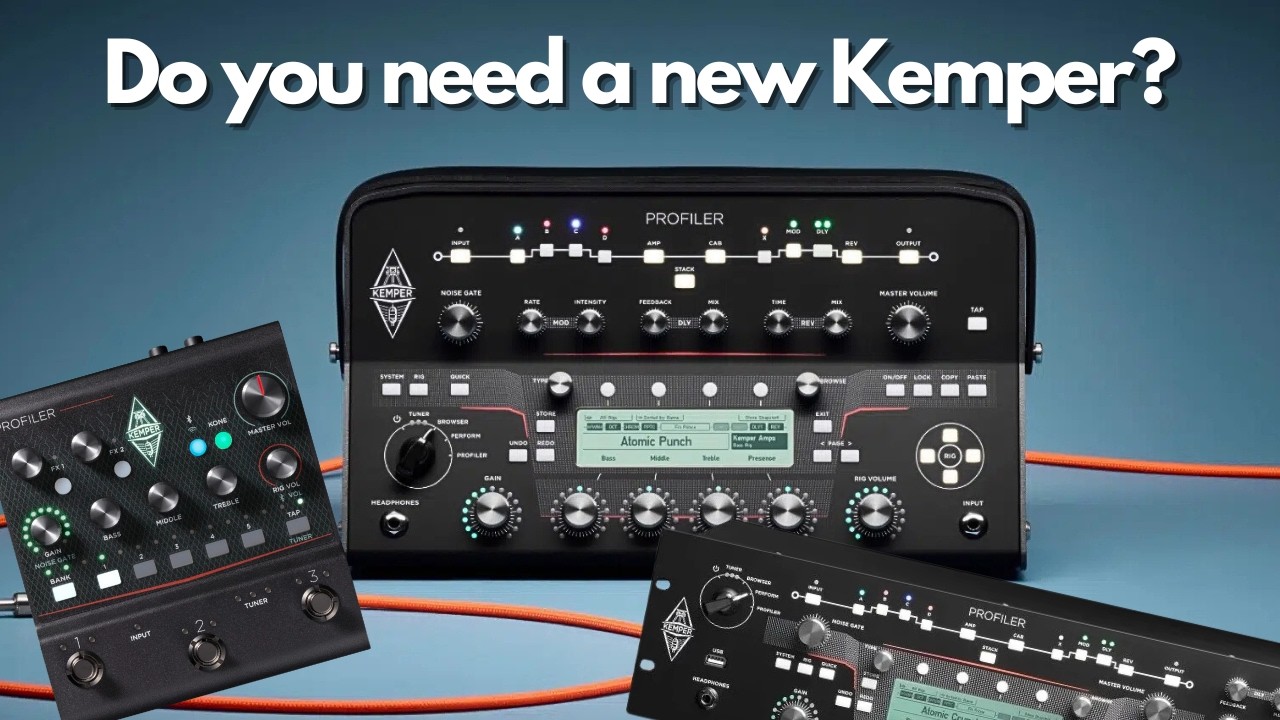
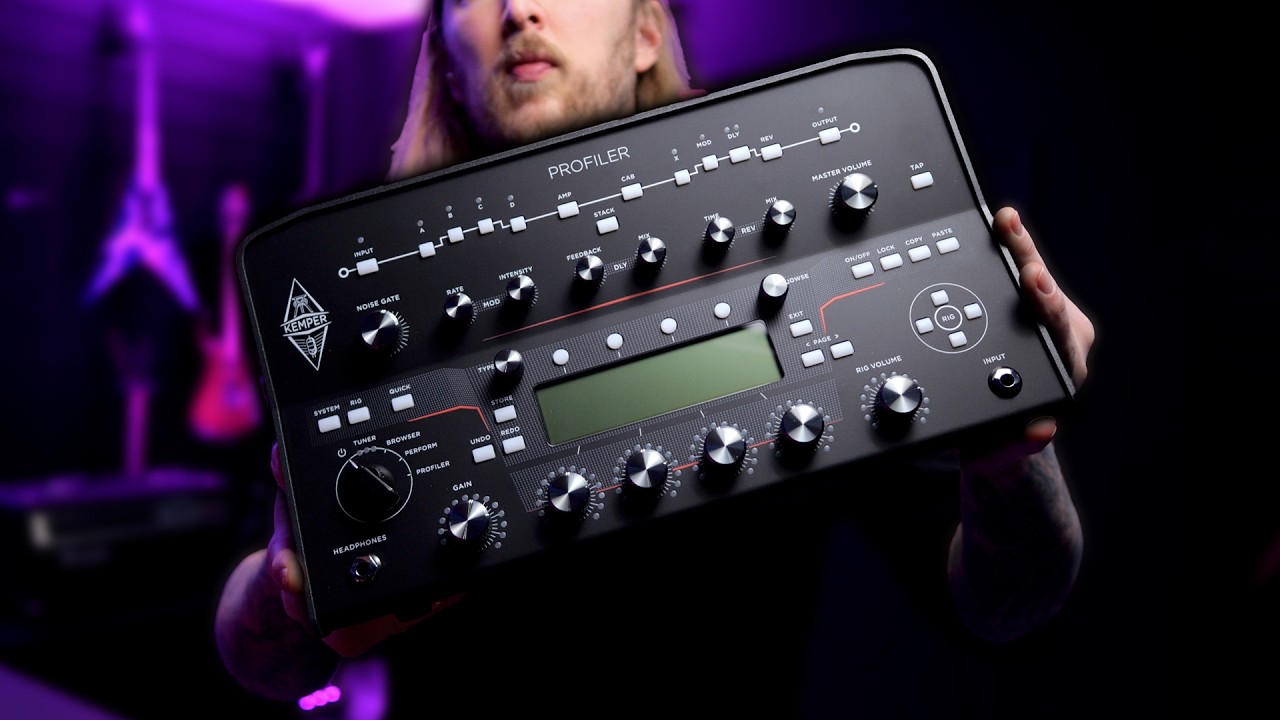
The most immediate thing that catches the eye about the Kemper Profiler is how it looks. Its front panel is an assortment of 52 buttons and knobs of various shapes and sizes, with a healthy dose of different colored lights, all contained in its not-quite-rectangular chassis. To some, it’s a retro impression of future chic, to others it’s a space-age toaster.
It certainly stands out, and while it is divisive, I fall into the former camp as I can’t help but enjoy its rather brave aesthetic. With the exception of the large section of unpainted metal at the back, which makes the reverse feel a little less than premium.

The same can be said of the LCD screen, which, although functional, doesn’t feel as modern as the color alternatives of other pieces of digital gear from the likes of Neural, Line 6, or Fractal. As I said, the competition is fierce.
To some, it’s a retro impression of future chic, to others it’s a space-age toaster.
In terms of longevity, I have no worries there. While the buttons have a bit of a plasticy feel, they and all the rotary knobs have a resistance that gives me confidence that they will last.
Combine that with a hard-wearing aluminum chassis that looks well built with no visible defects, and it’s a bit of gear that will survive all but the most unreasonable of abuse.
Usability and features

Usability and features rating: ★★★★☆
As we have come to expect from high-end digital gear, the I/O is extensive. Featuring two ¼” inputs, an XLR and ¼” return input (primarily intended for profiling), left and right XLR and ¼” main outputs, USB Type A and USB type B, Cat 5 network port, two expression pedal/switch ¼” jacks, MIDI in, out, and through, SPDIF in and out, and a ¼” monitor output.
So, as far as the guitar goes, all bases are covered. We are seeing digital gear begin to push into doing more, with the likes of the Helix Stadium being capable of running backing tracks and stage lights.
However, personally, I prefer Kemper's approach, as I'd rather see features remain focused on processing the guitar sound. We already have equally good, sometimes better, options for dealing with these other aspects of being a musician elsewhere.
The sheer number of controls could be a little intimidating
On the front panel, while the sheer number of controls could be a little intimidating at first glance, after a bit of time with the unit, it’s not as complex as it initially appears.
For example, the buttons across the top represent the blocks in your signal chain. Press to turn the block on or off, and hold to edit it. When editing blocks, amps, or anything else you need to change, the relevant parameters are neatly displayed along the bottom of the LCD screen and are aligned with the four rotary knobs beneath it. These are then used for making adjustments, while the Page left/right buttons navigate to a new set of four parameters if needed.

From multiple routing options to in-depth parameter editing and features, the Profiler is inevitably quite menu-heavy. However, the way access to menus and functions is spread across a number of controls splits things down into digestible chunks.
For example, buttons like System (system settings), Rig (Rig settings), and Browse (for browsing through Rigs) make those three separate menus just a single press away. Also, separate controls for Exit, Store, Copy, and Paste provide quick access to those functions, and the four soft-touch buttons across the top of the screen align with different filters and check boxes, again making browsing through those menus much easier.
The result is that, once you get used to where everything is, getting around the hardware isn’t too taxing on the brain. This is something I’m appreciative of, as I don't really fancy a deep dive into the 417-page manual.

Similarly, the large chicken-head knob on the left of the unit separates the three main functions. Browser for searching through and editing presets, Performance for playing live, and Profiler for creating profiles.
Browse mode allows for browsing through more Rigs than you will ever need, with the hardware's total capacity being up to the four-figure range.
Switching to Perform mode allows me to set five Rigs per performance slot, with 125 slots in total. Handy for setting up quick access to a bank of sounds for a gig, or parts of a song for live use. However, you are going to want to purchase the separate Kemper Remote foot controller for switching Rigs during a live performance.

So far, so easy, but there are a few quirks that get in the way. The new Fixed Effects, of which there are two blocks, the first consisting of six effects set before the amp section and the second containing two effects post-amp, are not accessible from the signal chain section on the hardware like the rest of the effects, but instead are accessed from the Rig menu, which is a little confusing.
The blocks pre the amp section are all mono and labeled A, B, C, and D. The post amp effects blocks are stereo and labeled X, Mod, DLY, and Rev (this is all outside of the new fixed effects). The Mod DLY and Rev blocks have two quick access knobs each for adjusting vital parameters - for example, Time and Mix for the reverb.

That’s pretty handy and well thought out; however, we can assign any effect to any of these blocks, meaning, for example, the Rev block may not be reverb, in which case the Time and Mix controls are then no longer Time and Mix. I can’t help but feel that with this level of functionality, a bigger screen and fewer buttons may be the easier way for most users to interact with the unit.
The biggest issue is that there is a bit of a delay between turning a rotary knob and the associated parameter change. There is a lot to browse through here, so having this dead zone in the control makes things feel quite clunky.
As a result, most are going to want to do the bulk of their setting up via the Rig Manager app and reserve front panel tweaking for rehearsals and gigs.
The app is fairly simple, consisting of your libraries to the left, browser in the middle, search function to the right, and then your signal path and Rig editor at the bottom. The libraries include the Rig Exchange, which is where you can seamlessly download user-created Rigs and profiles that have been uploaded there by users for free.
Downloading profiles from online stores outside of the Rig Exchange is a matter of dragging and dropping the profile from your operating system's file manager into the app. The ease with which these are added is important, as the Kemper Profiler lives and dies on the quality of created profiles, so users are likely to be frequently experimenting to get the best out of the unit.
Rigs and Performances can also be edited from the mobile version of the app; however, you will need to establish a connection by hooking up the Profiler to the same router as your device via an Ethernet cable. A method that feels a little old school at this point. On that, though, it's worth noting that the more portable Kemper Stage and Profiler Player have built-in WiFi capability.

Getting stuck into editing Rigs within the app, there are a ton of options here. For example, the Output block contains multiple parameters across its many outputs for things like pads, turning the cabinet emulation on and off, EQ settings, USB re-amping, output level control, and much more. But it is all nicely displayed and easy to decipher.
On both the Rig Manager app and the hardware itself, the interface for adding effects and profiles to the blocks in the signal chain is not as visual as something like the Line 6 Helix or Quad Cortex, and instead opts for text-heavy menus. This makes the Rig Manager feel a little dated, and perhaps for some, a bit overwhelming at first glance. But, again, once time is spent here, the menus are well laid out and relatively simple to navigate through.
What all this adds up to is a unit that will take a bit of time to get used to, but one that is easier to use than initial impressions may suggest.
Sounds
Sounds rating: ★★★★½
The first thing to make clear about the sounds of the Kemper Profiler is that we are completely beholden to the creator of the profile being used. A good amp, set nicely, mic’d well, and profiled correctly, will result in a great sound. If the person doing the profiling falls short on any one of these steps, there's not much that can be done to rescue it.
Thankfully, the Kemper Profiler MK2 comes preloaded with over 300 Rigs, with plenty more available through curated and free packs that are easily accessible from the Rig Manager.
For the most part, they are very gig-able. Particularly, the Michael Britt profiles, with the Mars Silvie Jubi 2 6 being an immediate favorite. Testing with my Fender Stratocaster through a Tonex Cab FRFR speaker, it’s a huge, mid-forward, Marshall sound, perfect for those heavy rock tones of the eighties.

I find that in the Rigs I am enjoying less, it’s usually because of a low mid build-up that muddies things up a bit. The LL Big Rock Rig is a good example of this, as another high-gain, classic rock rig that is fun at home, but just a bit too woofy to gig with.
However, all of the pre-loaded Rigs are of the Classic Profiling technology, rather than the new Profiling 2.0 way of doing things. Kemper claims this is a more accurate process, analyzing over 1,00,000 individual frequency points with other highlights including Cabinet Resonance detection and control, Smart D.I profiling to automatically detect when the user is profiling an amp without a cabinet, and automatic matching of the Gain and Definition controls.
Testing this, I’m doing three things - creating a profile of a Fender 30th Anniversary Hot Rod Deluxe using both the Classic and Profile 2.0 processes for direct comparison, downloading two free Fender ‘65 Deluxe Reverb profiles from Tone Junkie, again one being a Classic Profile and the other being a Profile 2.0, and getting stuck into a 2.0 Rig back from Thomas Dill.

With some direct comparison available in the first two cases, the 2.0 was just a little clearer in the low mids and, as a result, feels more open. Additionally, the 2.0 is slightly more reactive under the fingers, increasing its amp-like nature. These differences are subtle, probably difficult to detect outside of an A/B test, but they are certainly there.
When it comes to accuracy, the Profile 2.0 is closest, if a little brighter than the recorded version of the Hot Rod Deluxe. A little tweak of the Definition control gets things indistinguishable outside of a direct comparison.
It’s worth mentioning that the Tone Junkie Deluxe Reverb profile is excellent. It’s a lively, clean sound that, by utilizing the Liquid Profiling, can be pushed with the Gain control into some classic Fender crunch. Liquid Profiling, as promised, allows for plenty of tweaking within the EQ, just like using an actual amp and removing the restrictions usually associated with amp captures.
There are a lot of fun sounds in the Thomas Dill pack too, especially when it comes to the heavier Peav V Sixty-Five Five and Mars SLP, although I find the high end to be a little brash on some of the cleaner models.

It’s not all about the profiling, however, as we have a healthy selection of effects here too. A quick bit of housekeeping before we get stuck in, though. Kemper separates effects by category (Drive, Modulation, Delay), then Effect Type, which is the individual models (e.g, Screamer, Rat, Memory Man), and then Preset, which is a suggested setting for the Effect Type.
Drives are always a good place to start, and as I load the Green Scream, what comes out is a great imitation of the Tube Screamer, with that compressed mid-forward hump we all know and love coming through well. Other highlights include the Mouse and Muffin, which has me spending way too much time enjoying Big Muff and Pro Co Rat flavored tones.
The Kemper Drive and Kemper Fuzz effect types are interesting, as they are Kemper-specific Effect Types that are built to imitate a host of pedals via a surprisingly small suite of powerful controls, or allow the user to come up with something unique.

It’s the latter that’s a bit more fun, as I don’t feel the presets do as good a job as the specific models. For example, the 808 presets in the Kemper drive lack the same compressed feel of a real Tube Screamer that is reflected in the Green Scream.
But the Definition and Slim Down controls of the Kemper Drive add extra tweak-ability to the low and high ends, and when coupled with a traditional tone control and a wide sweep of gain, make the Kemper Drive extensively shapeable.
Similarly, the Transistor Shape and Transistor Tone controls in the Kemper Fuzz can take it from all-out spitty, angular type of chainsaw fuzz, to a smooth Big Muff-like sound. In short, there is a lot of fun to be had here.

Getting into the more wobbly and space-creating stuff, the Vintage Chorus is an immediate favorite for some subtle widening of a tone thanks to the way it preserves the quality of the original signal while adding a little movement.
Other highlights are the Phaser, which lends itself well to EVH-style sweeps, as well as the simple Single Delay that’s great for some lightly modulated slap-back. Again, I am impressed by how the fidelity of the original signal is maintained, allowing plenty of high-end to come through and still cut in a mix.
Onto some reverbs and to what is perhaps my favorite effect in the Profiler - The Natural Reverb. It does what it says on the tin - adds a natural feeling reverb to your tone, genuinely feeling like a real verb from a guitar in a room, encapsulating the tone without getting in the way.
There are, of course, more outlandish options, such as the Ionosphere Reverb, which can take us into infinite ethereal halls, with no fewer than 19 parameters to adjust. The only reverb I’m not a fan of is the Spring reverb, as it just feels a little separate from the original signal, rather than part of it.
Verdict

Let’s get the negative stuff out of the way first. In the current market, the small LCD screen and its lack of color, along with the sheer number of buttons on the front panel, make the Kemper Profiler MK2 feel a little dated compared to the sleek, efficient interfaces of its competition, namely the Quad Cortex and Line 6 Helix Stadium, which both now sport capture technology. Additionally, the aesthetic, whilst I am a fan, is divisive, and hasn’t seen any real update since MK1.
However, after spending some time with the Profiler Head MK2, it quickly starts to feel familiar and easy to use.
Yes, there is a learning curve, but it's one that most will be able to navigate through. And if you don’t like screens and would rather tactile buttons and controls, the Profiler Head is perhaps the perfect option for you.
Spending the time is worth it
And spending that time is worth it, as looking past the dated interface will reveal some killer tones. Kemper’s Profile 2.0 technology is a bona fide improvement over the classic capture method, even if it is a subtle change, and the effects are of the high-end nature you would expect from a company like Kemper.
The flexibility of Liquid Profiling also opens up the Kemper to those who prefer the tweak-ability of modeling, although it is worth noting that you still need to start with a good profile as a foundation.
And that is the crux of what makes the Kemper Profiler MK2 a worthwhile consideration. The profiling is accurate with an amp-like feel. If you have the facility to create good profiles yourself, you can take your favorite amp on the road. If not, you can find a profile that someone else has expertly crafted, and ensure you have a great tone at every gig.
Guitar World verdict: The look may not be for everyone, and the small LCD screen makes the Kemper MK2 feel a little dated compared to the competition, but it delivers when it comes to tone. With new Profiling 2.0 leading the way, and a suite of high-end effects, it is a formidable competitor in the digital amplification world, once you get that initial learning curve out of the way.
Test |
Results |
Score |
|---|---|---|
Build quality |
Aesthetically divisive and a some unfinished metal at the rear, but a product built to last. |
★★★★½ |
Usability and Features |
There is a learning curve, but one that most people will be able to stomach. |
★★★★☆ |
Sounds |
Stellar profiles and a high quality selection of effects. |
★★★★½ |
Overall |
Built to last and excellent sounds to be had after some time is spent getting used to the interface. |
★★★★½ |
Also try
Hands-on videos
Ola Englund
Kemper

Tone Junkie